Required configuration
Follow these requirements so the crawler can extract structured records from your website. Update your markup and crawler configuration where needed.
If your website uses one of the supported framework integrations, its generated markup might already meet these requirements. Confirm that the crawler selectors match your framework and version.
Generic configuration example
Start with the default DocSearch configuration template. For more customization options, see complex record extractors.
If you use a framework integration, see the configuration templates.
docsearch-default.js
new Crawler({
  appId: 'YOUR_APP_ID',
  apiKey: 'YOUR_API_KEY',
  startUrls: ['https://YOUR_START_URL.io/'],
  sitemaps: ['https://YOUR_START_URL.io/sitemap.xml'],
  actions: [
    {
      indexName: 'YOUR_INDEX_NAME',
      pathsToMatch: ['https://YOUR_START_URL.io/**'],
      recordExtractor: ({ helpers }) => {
        return helpers.docsearch({
          recordProps: {
            lvl0: {
              selectors: '',
              defaultValue: 'Documentation',
            },
            lvl1: ['header h1', 'article h1', 'main h1', 'h1', 'head > title'],
            lvl2: ['article h2', 'main h2', 'h2'],
            lvl3: ['article h3', 'main h3', 'h3'],
            lvl4: ['article h4', 'main h4', 'h4'],
            lvl5: ['article h5', 'main h5', 'h5'],
            lvl6: ['article h6', 'main h6', 'h6'],
            content: ['article p, article li', 'main p, main li', 'p, li'],
          },
          aggregateContent: true,
          recordVersion: 'v3',
        });
      },
    },
  ],
  initialIndexSettings: {
    YOUR_INDEX_NAME: {
      attributesForFaceting: ['type', 'lang', 'language', 'version'],
      attributesToRetrieve: [
        'hierarchy',
        'content',
        'anchor',
        'url',
        'url_without_anchor',
        'type',
        'lang',
        'language',
        'version',
      ],
      attributesToHighlight: ['hierarchy', 'content'],
      attributesToSnippet: ['content:10'],
      camelCaseAttributes: ['hierarchy', 'content'],
      searchableAttributes: [
        'unordered(hierarchy.lvl0)',
        'unordered(hierarchy.lvl1)',
        'unordered(hierarchy.lvl2)',
        'unordered(hierarchy.lvl3)',
        'unordered(hierarchy.lvl4)',
        'unordered(hierarchy.lvl5)',
        'unordered(hierarchy.lvl6)',
        'content',
      ],
      distinct: true,
      attributeForDistinct: 'url',
      customRanking: [
        'desc(weight.pageRank)',
        'desc(weight.level)',
        'asc(weight.position)',
      ],
      ranking: [
        'words',
        'filters',
        'typo',
        'attribute',
        'proximity',
        'exact',
        'custom',
      ],
      highlightPreTag: '<span class="algolia-docsearch-suggestion--highlight">',
      highlightPostTag: '</span>',
      minWordSizefor1Typo: 3,
      minWordSizefor2Typos: 7,
      allowTyposOnNumericTokens: false,
      minProximity: 1,
      ignorePlurals: true,
      advancedSyntax: true,
      attributeCriteriaComputedByMinProximity: true,
      removeWordsIfNoResults: 'allOptional',
      separatorsToIndex: '_',
    },
  },
});
recordVersion: 'v3' selects the crawler record schema. It isn't the DocSearch UI version and works with the v5 frontend packages. If you expose lang, language, or version as v5 facets, add those attributes to attributesForFaceting. Keep a badge attribute in attributesToRetrieve when you pass it to resultBadgeKey.
Overview of a clear layout
Use a page layout that separates documentation content from navigation and other page elements:
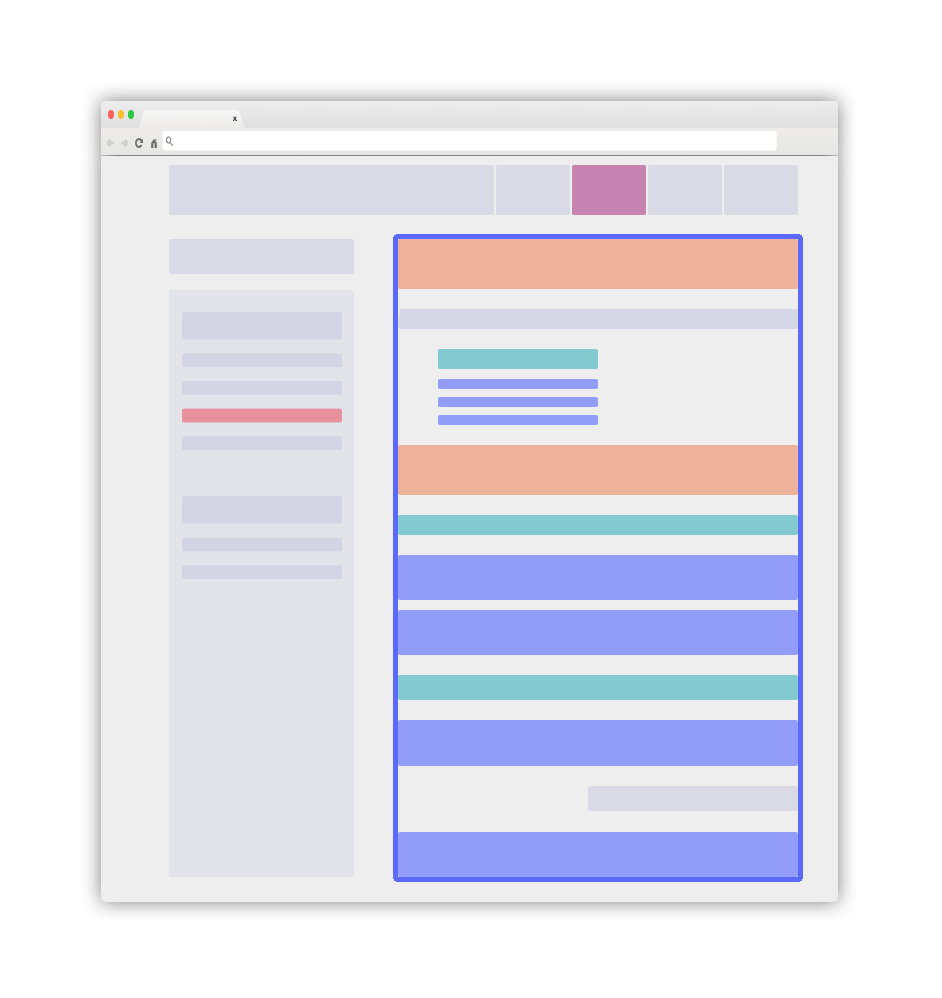
Use the main blue element as your .DocSearch-content container. Follow the next guidelines to structure its contents.
Use the right classes as recordProps
Add static classes to identify each content role. These classes don't need to change the page's appearance. The crawler uses them to extract structured records.
-
Add a static
DocSearch-contentclass to the main container for your text. This container is usually a<main>or<article>element. -
Configure every searchable
lvlelement outside the main documentation container, such as a sidebar item, as aglobalselector. The crawler adds these elements to every record from the page. Keep levels in increasing order in the document flow:lvlXshould followlvlYwhenX > Y. -
Use standard heading elements, such as
h1,h2, andh3, forlvlXselectors. You can also use static classes. Add a uniqueidornameattribute to each matching element. -
Give every element that matches an
lvlXselector a uniqueidornameattribute. DocSearch uses this anchor to open the page at the matching element. -
V5 builds result breadcrumbs from the populated
hierarchy.lvl0throughhierarchy.lvl6attributes. Keep heading levels ordered, avoid gaps where possible, and retrieve the fullhierarchyobject. -
Wrap every element that matches the
recordProps.contentselector in a<p>or<li>element. Split text into focused blocks, and don't nest matching elements because this creates duplicate records. -
Keep the content structure consistent throughout the document.
Introduce global information as meta tags
The crawler automatically extracts information from DocSearch-specific meta tags:
<meta name="docsearch:language" content="en" />
<meta name="docsearch:version" content="1.0.0" />
The crawler adds the content value of these meta tags to every record extracted from the page. Each tag's name attribute must follow the docsearch:$NAME pattern, where $NAME is the record attribute to set.
The docsearch:version meta tag can be a set of comma-separated tokens, each of which is a version relevant to the page. These tokens must be compliant with the SemVer specification or only contain alphanumeric characters (e.g. latest, next, etc.). As facet filters, these version tokens are case-insensitive.
For example, add the following meta tag to assign two versions to every record on a page:
<meta name="docsearch:version" content="2.0.0-alpha.62,latest" />
The crawler adds the following version attribute to each record:
{
  "version": ["2.0.0-alpha.62", "latest"]
}
Add these attributes to attributesForFaceting. You can then use them in per-index facetFilters or expose up to five controls with the v5 facets option. To show version in each result, retrieve it and set resultBadgeKey to version.
Nice to have
-
Keep your sitemap up to date so the crawler can identify changed pages. The crawler also discovers eligible links from crawled pages.
-
Ensure that every page provides its full context. Use global elements where appropriate.
-
Make your documentation content available without client-side JavaScript rendering. If your website requires JavaScript rendering, set
renderJavaScript: truein your configuration.